
This guide shows how to put a standard Google Analytics 4 (GA4) tag behind NexusConsent on Joomla 5 or 6, and how to check that it follows the visitor's choice. If you use Google Tag Manager (GTM), also read the GTM section below.
Consent Mode tells supported Google tags which storage and advertising uses the visitor has allowed. A loaded Google tag can still send measurements without cookies when storage consent is denied. Blocking the tag until consent is a separate step. Google's Consent Mode overview explains the distinction.
Set up a direct GA4 tag
1. Check where your Google tag is installed
Keep one copy of your standard GA4 tag, with your own measurement ID. It may already be supplied by a Joomla extension or your template. NexusConsent does not install GA4, create a Google account, or set your measurement ID.
If you need to add the tag, use your template's supported integration or a head-code extension. A Custom HTML module may remove scripts through editor or text filters, so do not assume that pasting a snippet there installed it. Joomla's editor guide explains those filters.
Check for another cookie plugin or template snippet that also sets consent defaults. Use one consent solution to manage this setup so their settings do not conflict.
2. Enable NexusConsent and check the blocking preset
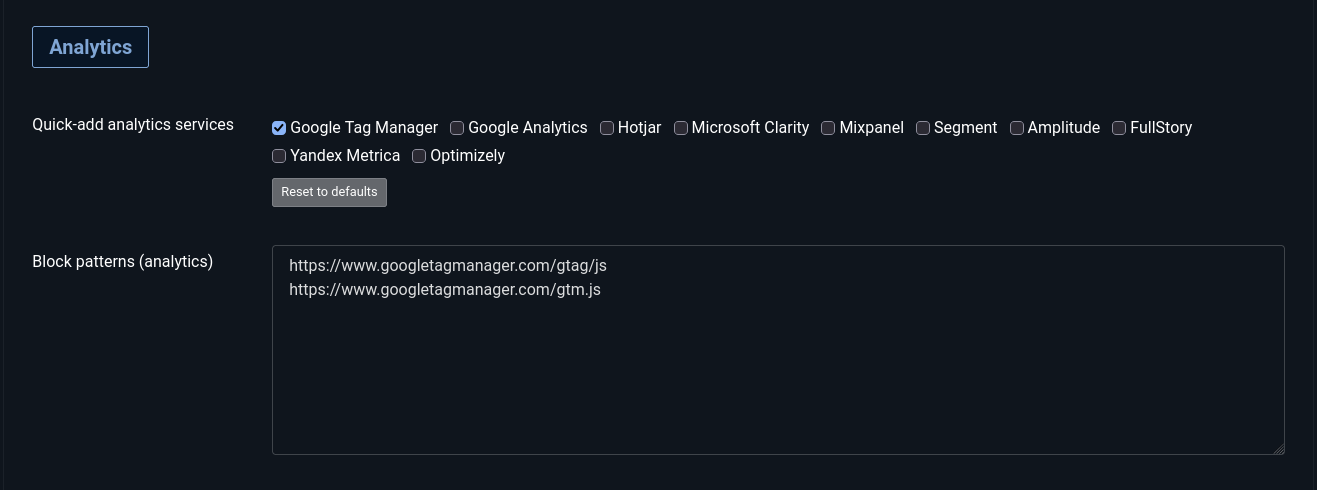
Open System → Plugins, search for NexusConsent, and enable it. In its Patterns tab, under Quick-add analytics services, make sure Google Tag Manager is selected, then save. Until the plugin settings are saved for the first time, every quick-add preset in every category is already active, so the preset may be selected before you change anything.
The preset includes these two loader URLs:
https://www.googletagmanager.com/gtag/js https://www.googletagmanager.com/gtm.js
Despite its name, this is also the preset for a standard direct GA4 tag: GA4 uses the first URL. The separate Google Analytics preset covers the older
google-analytics.com/analytics.js loader; it does not cover the GA4 loader.
If your extension uses a different loader URL, such as a URL on your own domain, add its actual URL to Block patterns (analytics) and verify it. Patterns match URL substrings; they do not discover every tracking request.
3. Review your consent text and existing visitors
Make sure the notice and privacy policy describe the services you use. NexusConsent's Analytics choice controls GA4 in this setup.
If a change to services or purposes requires visitors to choose again, increase Config version on the Basic tab and save. NexusConsent treats a decision stored with a different version as undecided and asks again. This setting is separate from the plugin's release version.
When you add patterns to a category that previously had none, increase Config version if you want returning visitors to be asked about it. Until they choose again, the newly offered category stays denied. Changes to services or purposes within an already offered category also need your Config version policy.
4. Clear caches and test
Clear Joomla's cache after changing the setup. If you use a CDN or another page cache, clear that too and check its consent handling as described below. Run the verification steps before considering the setup complete.
How NexusConsent maps the choices
NexusConsent sends four Google consent parameters, each as granted or
denied:
- Analytics controls
analytics_storage, for analytics-related storage. - Marketing controls
ad_storage,ad_user_dataandad_personalization, for advertising storage, advertising user data and personalised advertising respectively.
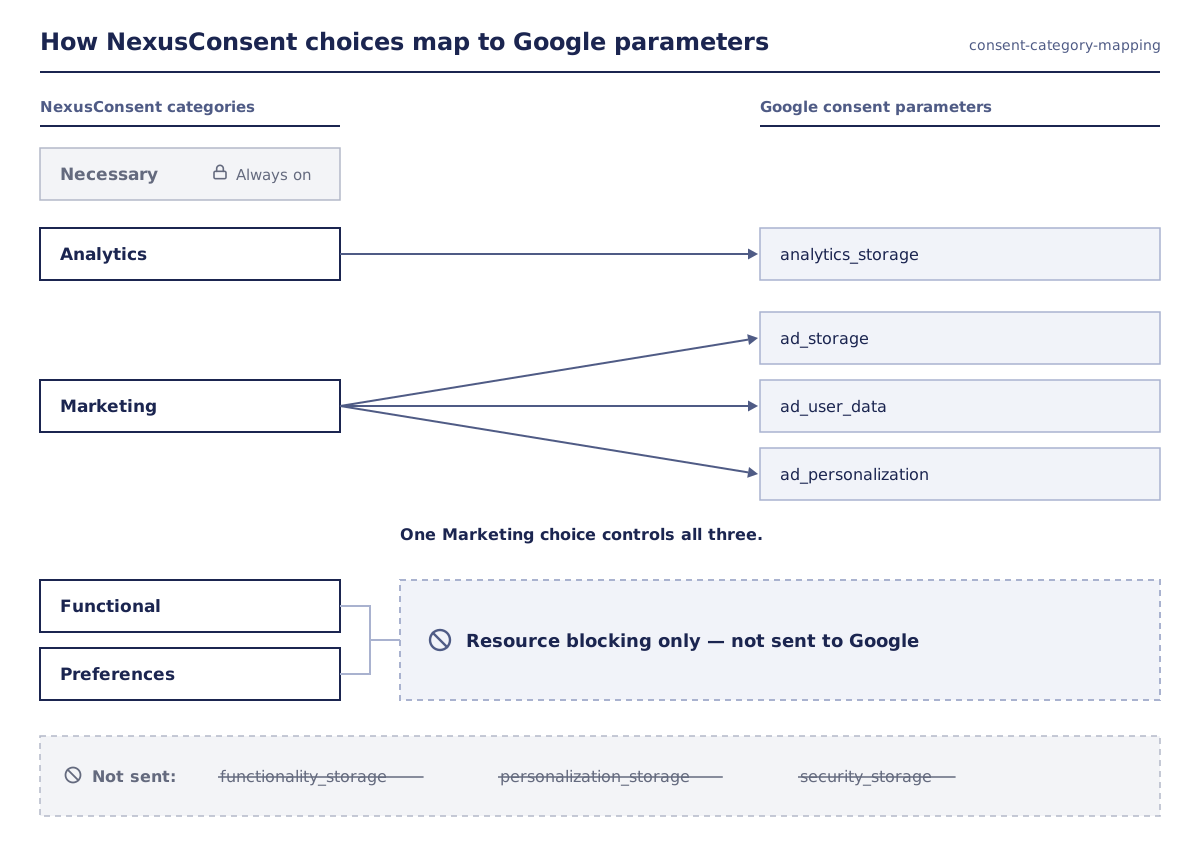
The three advertising parameters have different purposes. NexusConsent groups them under one Marketing choice; it does not offer separate switches for each. See Google's consent type definitions.
Functional and Preferences control NexusConsent's resource blocking.
The plugin does not map them to Google's functionality_storage or
personalization_storage, and it does not send security_storage.
Granting Marketing does not release a GA4 or GTM loader assigned to Analytics. The category of the blocked resource determines when it can load.
What happens on the page
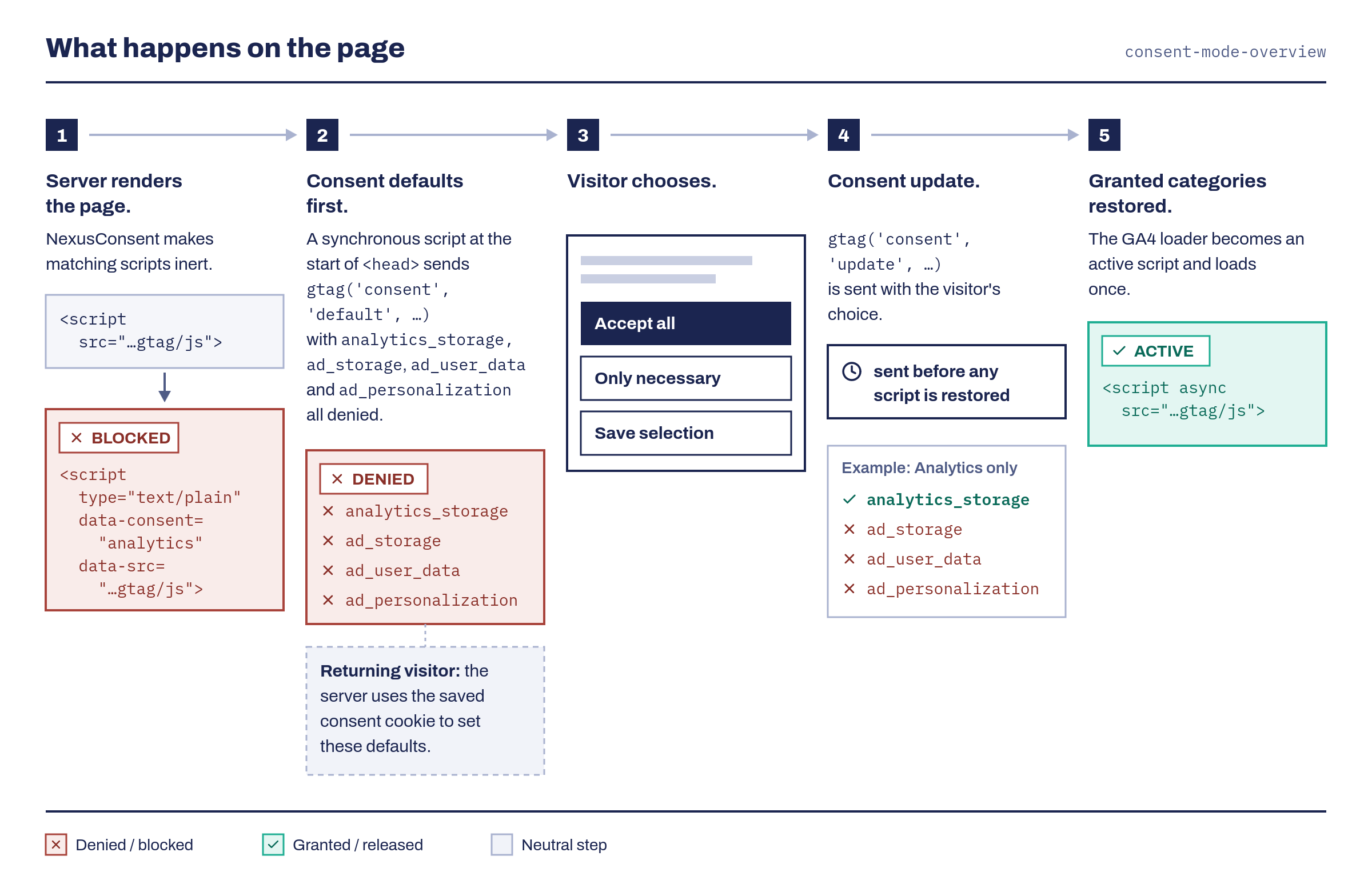
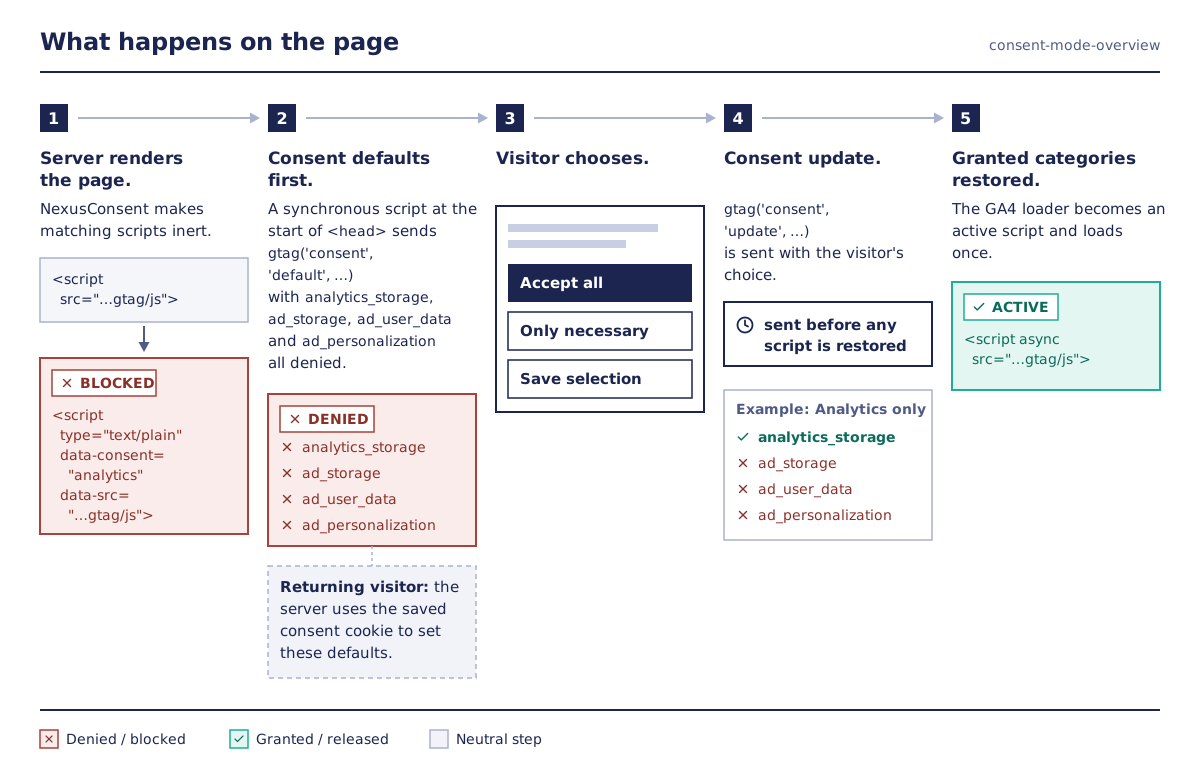
With the preset above and no valid stored consent, NexusConsent:
- Makes matching scripts in Joomla's rendered HTML inert. It also blocks
recognised inline initialisers, including standard
gtag(...)anddataLayersnippets, while Analytics is denied. - Inserts a synchronous consent-default script at the start of
<head>, with all four Google parameters denied. - Shows the visitor a consent choice.
- Sends a consent update when the visitor decides, before restoring scripts for the granted categories.
On later pages, the server uses a valid consent cookie to set the defaults and decide which resources to block. The browser also sends an update during initialisation. An update on page load is therefore expected, even before a new decision.
The synchronous script is added only when the Analytics or Marketing pattern
list is non-empty and the response contains a <head> element. Without it,
the browser bundle still sends consent defaults and updates later; that is not
an early default for a Google tag already running during page parsing.
Google requires defaults before measurement commands such as config or
event. NexusConsent's update-before-restoration order supports that sequence
for resources it blocks. See Google's implementation guide.
This blocking setup follows basic Consent Mode for the tags it successfully holds back. Advanced Consent Mode loads Google tags before consent and can send cookieless pings. Basic mode can still use Google's general conversion model; advanced mode can support a more detailed advertiser-specific model. Neither setup guarantees eligibility for modelling. Google compares the two approaches here.
Verify the setup
Use a fresh private session. Close all private windows between fresh-visitor tests, or clear the site's cookies and local storage. Test through your public site URL so any CDN or proxy is included.
Before choosing
Open View Page Source. Near the start of <head>, find
data-nxc-bootstrap="1". For a fresh visitor, its four consent values should
be denied.

Search for your GA4 loader. Its placeholder should resemble:
<script type="text/plain" data-consent="analytics"
        data-src="https://www.googletagmanager.com/gtag/js?id=G-XXXXXXXXXX"></script>
Extra attributes may be present. The important checks are type="text/plain",
data-consent="analytics", and the URL in data-src rather than an active
src. Check the inline GA4 initialiser is inert too. Use page source for this
check: the live Elements view changes when scripts are restored.
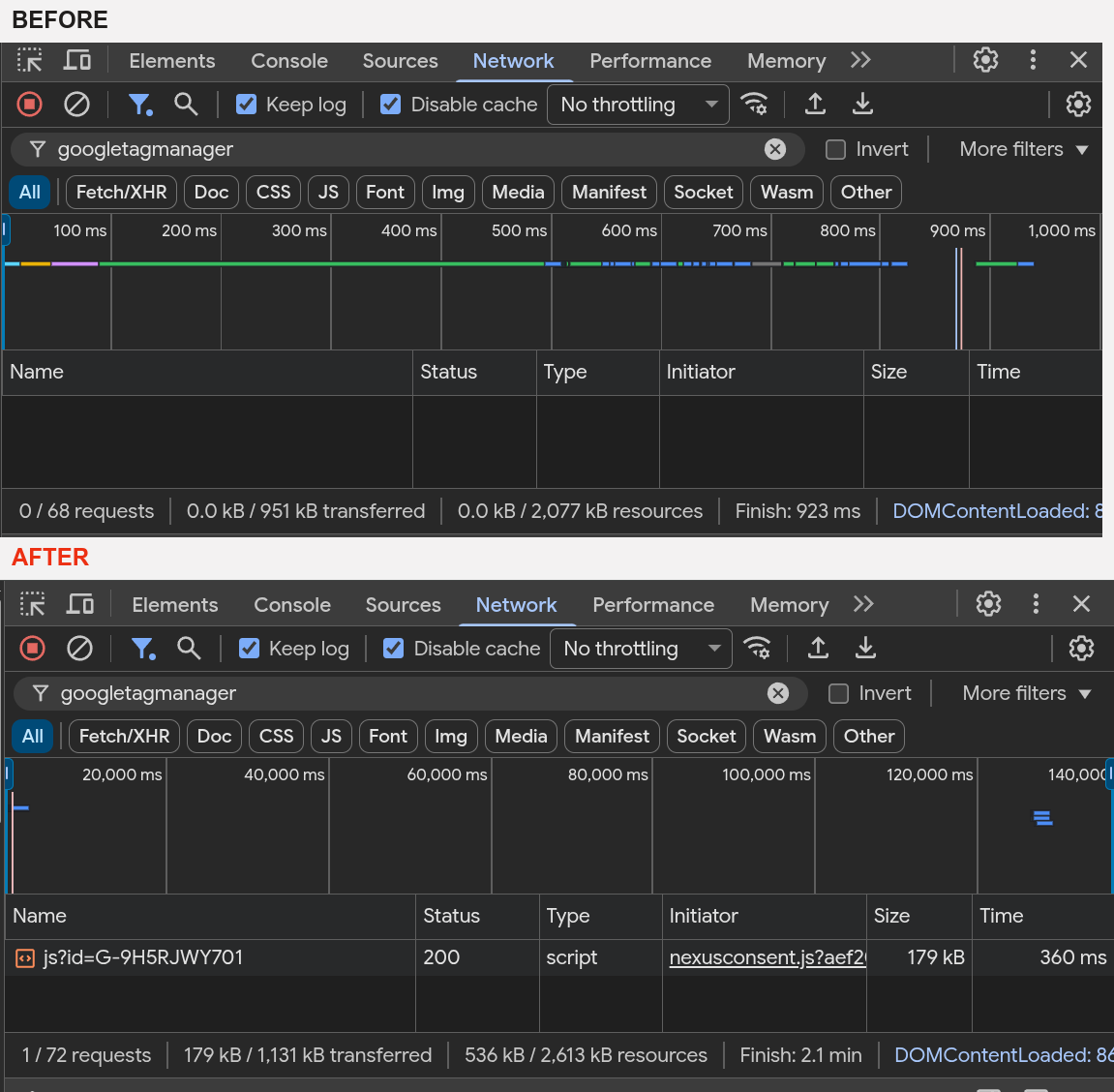
In browser developer tools, open Network, then reload without accepting.
Check googletagmanager.com, google-analytics.com and doubleclick.net
separately, plus any custom tracking hosts your site uses. A filter containing
only google misses doubleclick.net.
For this basic setup, the GA4 loader and measurement requests should be absent before consent. Investigate any request's Initiator to find what made it; a visible banner alone does not prove the tag is blocked.
After accepting Analytics
Accept Analytics. The GA4 loader should now load. In the Console, inspect the consent commands queued by the page:
(window.dataLayer || [])
  .filter(entry => entry?.[0] === 'consent')
  .map(entry => Array.from(entry));
Look for a default followed by update commands. The decision update should
have analytics_storage: 'granted'. The three advertising values should stay
denied unless Marketing was also granted. Other entries and an earlier
page-load update are normal; the decision update is not necessarily the
second entry in dataLayer.
Check Application → Cookies for GA4 cookies such as _ga and _ga_….
Cookie creation can be affected by browser restrictions or blocked requests,
so use this alongside the network and consent checks.
Google lists GA4's cookies here.
Test changes and returning visits
- Only necessary: all four parameters remain denied; the Analytics loader stays blocked.
- Accept all: every offered category is granted; matching resources are released. On a site without Marketing services, the three advertising values stay denied.
- Analytics only: analytics storage is granted; the three advertising parameters remain denied.
- Marketing only, if that choice is offered: the advertising parameters are granted, but the Analytics loader remains blocked.
- Revoke: use the consent control to revoke. NexusConsent sends denied values, clears its stored decision, attempts to remove known GA cookies it can reach, and reloads. Check the reloaded page is blocked again.
- Return with a saved decision: reload without clearing site data. Check that the defaults and blocked resources reflect that decision.
After updating to NexusConsent 1.9.0, choices saved by earlier versions are not reused: returning visitors see the banner once and choose again, and their new choice records which categories they were shown. Test returning visits with a choice made on 1.9.0 or later.
Revocation cannot undo data already sent or remove cookies on other domains. Cookie cleanup is limited to the names and domain/path combinations the plugin can reach.
Confirm with Tag Assistant
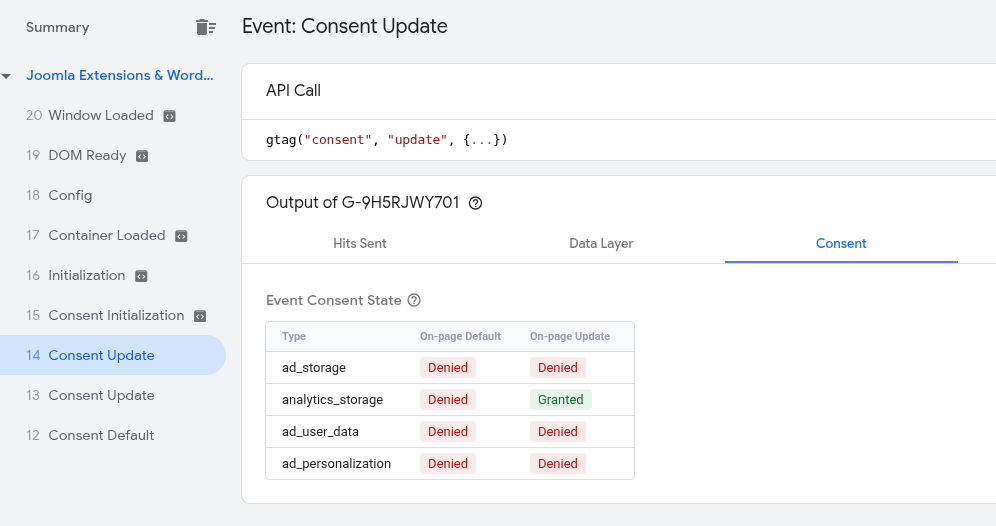
Use Google Tag Assistant to inspect the earliest consent default and the updates after your choices. A blocked Google tag or GTM container may prevent connection until you grant its category.
Check all four parameters, and for GTM check which tags actually fired. Google's Tag Assistant troubleshooting guide has the current instructions. A missing default warrants investigation; it does not by itself prove that the tag ran before the default.
Run the pre-consent network test separately from debugging tools, which can add their own requests. GA4 reports and DebugView can help confirm received events, but missing events there do not prove that the browser sent nothing. DebugView requires debug mode and may omit events when analytics consent is denied.
If you use Google Tag Manager
While Analytics is denied and at least one Analytics pattern is configured,
NexusConsent also holds inline scripts that mention dataLayer, gtag(,
ga(, _ga or _gid. This rule, not the preset's URLs, holds the standard
inline GTM loader before it can request gtm.js. It also holds other inline
code such as dataLayer.push(...) events from another extension; those
scripts run once Analytics is granted.
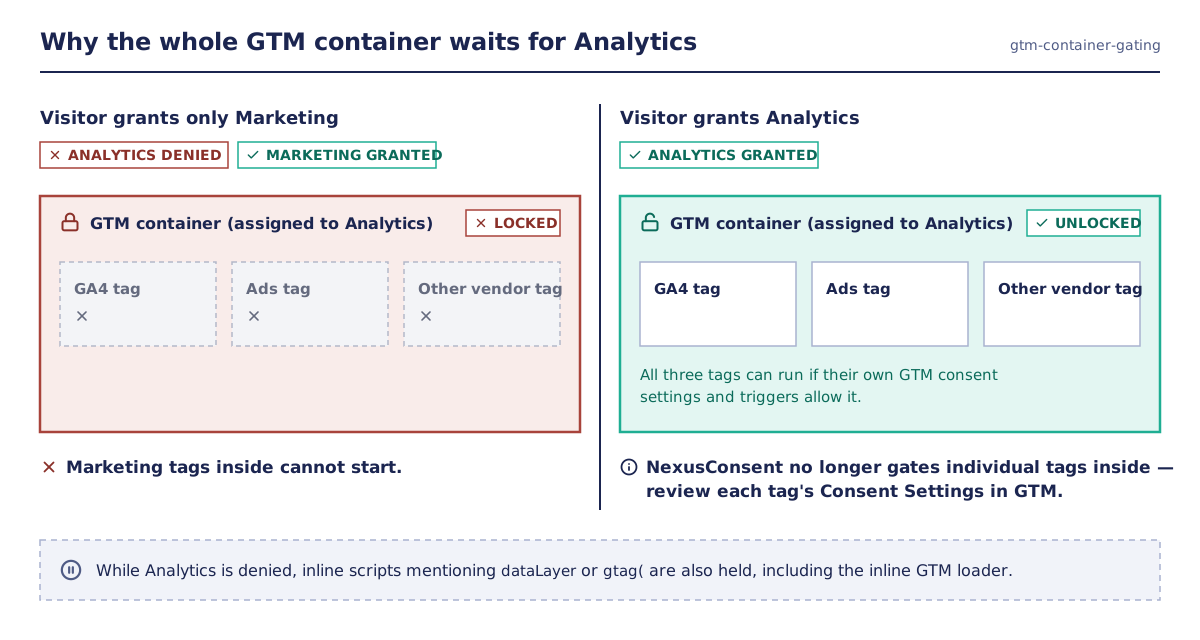
With the container assigned to Analytics, the whole container waits for Analytics consent. A visitor who grants only Marketing cannot start its marketing tags.
Once Analytics is granted, the container can run all its tags. A non-Google marketing tag inside it is not protected merely because NexusConsent blocked the container earlier. Its consent conditions and triggers need review.
In GTM, enable Consent Overview under Admin → Container Settings and review each tag's Advanced Settings → Consent Settings:
- Google tags with built-in consent checks adjust their behaviour to consent; those checks do not necessarily stop all requests when consent is denied.
- For tags that must not fire without consent, review Additional Consent
Checks and require the appropriate consent types. For example, an
analytics tag may require
analytics_storage. A tag must also meet its trigger conditions; adding a check does not create a trigger. - Consent Initialization is for tags that set consent, before other tags fire. It does not automatically connect a banner to GTM.
These controls are described in Google's GTM consent documentation.
NexusConsent sends page-level gtag('consent', ...) commands to the standard
dataLayer. It supplies no GTM consent template or custom consent-change event.
Google recommends its consent APIs for GTM templates because queued gtag
commands have timing limitations. Verify both consent state and tag firing in
Preview, especially when Marketing is granted after the container has already
loaded. A tag blocked on an earlier event may need a later trigger to run.
Google's implementation guide
covers the supported integration methods.
There is no advanced-mode switch in NexusConsent. Removing the container
URL from patterns is not a complete setup: the inline dataLayer initialiser
may still be blocked, and per-tag consent and update timing still need work.
Use a separately designed and tested integration if you want tags to load
before consent. Renamed data layers also require a custom integration.
Caching and blocking limits
- Joomla's built-in page cache: NexusConsent contributes consent state to the cache key where the Joomla API supports it, and disables that page cache when it cannot safely contribute a key. Test fresh and accepted visitors.
- CDNs, reverse proxies and other caches: the plugin does not configure
these. Have your cache administrator prevent accepted HTML being served to
undecided visitors, for example by bypassing pages with the consent cookie
(
nxc_prefsby default) and caching only the no-consent variant publicly. - Blocking coverage: URL patterns cover supported scripts, links and
iframes in rendered HTML. Inline matching uses known signatures, not a
complete JavaScript analysis. It does not block arbitrary
fetch, XHR,sendBeacon, images,noscriptcontent or CSS imports. - Dynamically added scripts: browser observation happens after insertion. It cannot guarantee prevention of either inline or external execution. Integrate the originating extension or use inert placeholders from the start.
- Large responses: above 10 MiB, the HTML blocking pass is skipped. The
response is marked
X-NexusConsent-Blocking: skipped-size; consent defaults may still be present. Those defaults are not proof of blocking. - Content Security Policy (CSP): NexusConsent carries Joomla's CSP nonce onto its bootstrap and preserves supported restoration attributes. Your CSP must still allow the required scripts; check the browser console for errors.
- Extra Google settings: NexusConsent does not configure
wait_for_update,url_passthrough,ads_data_redactionor regional defaults.
Google consent commands do not automatically control other vendors. Configure their blocking and any vendor-specific consent integration separately.
Troubleshooting
No early consent script in page source: check that NexusConsent is enabled,
Analytics or Marketing has a pattern, and the page contains <head>. Clear
caches. Commands appearing later in dataLayer do not prove early defaults.
The GA4 loader is still an active script before consent: check for duplicate installations or a different loader URL. Add the actual loader URL to Analytics patterns and retest. For a dynamically created loader, check its initialiser and the blocking limits above.
The tag stays blocked after accepting: confirm you granted its category. Check the Network and Console tabs for failed requests or CSP errors.
It works at the origin but fails at the public URL: check CDN/proxy cache rules and compare source for visitors with different consent states.
Further reading
This guide describes technical behaviour. Your consent notice, purposes and privacy obligations still need their own review; installing a plugin or passing Tag Assistant checks does not establish legal compliance.